Showing posts with label graphic design. Show all posts

Tuesday, May 28, 2013

Graduation Photo Dump

I am officially a college graduate! Well, not officially, because I have to wait until AUGUST for my diploma, but whatever. I participated in the ceremony, therefore, in my eyes, I am a college graduate.

It makes me kind of sad to be done, now that it's over. I feel like a whole part of my life is over. Most of mine and Dakota's relationship took place in college. Now that it's over, we will be spending far less time together. But really, we aren't one of those couples that are together 24/7. I will admit that I like to be home when he's home.. but I usually do my own thing. Anyways.

My graduation day started with lots of being lazy. We were both off  for the day, so we slept in. We went shopping. And then, I got my hair done. First time dying (erm, bleaching) in four years! My appointment was made for 1 PM to allow time to do everything, but my stylist didn't realize I didn't have any dye in my hair. The bleaching took like 20 minutes. Also, I didn't realize my hair was soooo long until Christina posted these pictures on Instagram later. I love her. If you are ever in the area, stop by and see her! She is seriously the best.Check out her Instagram of all the cool stuff she does! I really want some bright colors in my hair already. And its been blonde less than a week haha.

And what is really cool is she just left my natural hair the color it was.. so that it will grow out better than if she had dyed my hair darker. 


(Image Credit: Christina Steelman)

And she curled it for my graduation.. these curls lasted til after I got home.. like 10 PM. My hair is notorious for letting go of curls. But those stuck. Now I need to figure out how to use a curling iron.. Dakota loved it curled. (I use it and nothing happens. No curl. Tutorials, anyone, for dummies??) 


(Image Credit: Christina Steelman)

Close up of the color transition.. this is Ombre, folks! I love it!


And after waiting TWO HOURS for instructions, the graduation commenced, and I managed to find my parents afterward... (it was a MADHOUSE!) Forgive the cheesy smiles that will commence.....

My dad pretending to be short like us...


I obviously did NOT get the tall gene.


My mom wanted a picture with just us... :)


And of course one of my man and me.... First picture together in a long, long time. I definitely need to get in front of the camera more!


And here I am with my big smile..officially a college graduate!


Well, that's all folks. I'm done with college. Time to be an adult I guess.
But what if all I really want is a Capri-Sun and a fort with some coloring books?

Growing up is scary. But so exciting to start a new phase in my life!


Signature

Thursday, May 23, 2013

10 Things I LOVE About Being A Designer

I figured that yesterday's post was a little too depressing. I didn't want ya'll to think that graphic design is a bad job to have.

It isn't. It's just one of those jobs that people don't see as a job. You would be surprised at how many people are taken back when I say I went to school to be a designer.

But in light of the fact that I am accomplishing my childhood dream of being a (monetize able) artist today, I thought I would give you some things that I personally LOVE about being a designer, and why I think it is the best job in the world. I am going to TRY and keep it to ten, because I think of new things I love every day, and this list could get long.

1) I get to make artwork. Every single day.
 

2) I get to hear "OMG. I love it!" when I finish a job.

3) Time goes by fast when you are doing something you enjoy doing.

4) I get to see my work on the side of trucks, on the side of buildings, on t-shirts
.... (kinda vain, but it's still pretty cool.)


5) I get to solve problems in creative ways.
 
6)  People think I can do anything with a design. I see it as a challenge. A lot at my old job I would say, "I've never done it before, but I can certainly try!"
 
7) I get to learn something new almost every day.
 
8) There is a world of inspiration out there on the internet. Some days I feel like there are so many others out there better than me, but there always will be. But I can learn from them. And maybe, someday, somehow, someone will learn from me.

9) I get to communicate in non-verbal ways. Design is communication. I am not always good at the whole small talk thing. I don't make friends easily. But I can get my message across in design.

10) My job is also my hobby. I like to come home and talk about design here.  I like to play on Illustrator in my spare time. I get to love what I do, and still separate work from play. That's pretty awesome.

I hope this list doesn't make you too jealous. :P
But really,  I'm sure any profession you love will have a list like this. You just have to see the good parts. 

I am very glad to be graduating today. I have many people to thank for getting me here. More on that later. 

But now, now we celebrate!
 
Congrats to all the graduates from COS and other colleges! 


Signature

Tuesday, May 21, 2013

Graphic Design Pet Peeves

In honor of my impending graduation, I figured I should enlighten you all about the joys of being a graphic designer. I love being a designer. I really do. But like any other job, certain things get really annoying.
 
*Disclaimer: I don't mean this to be offensive. I don't care if you like Comic Sans. Personal preference. This is just from my experience in the four-ish years I've been doing this, professionally and in school.
 
 http://twistedsifter.files.wordpress.com/2012/02/what-my-friends-think-i-do-what-i-actually-do-graphic-designer.jpg
 
 
Using periods in phone numbers instead of dashes.
Not using the oxford comma.
Photoshop Error: "Not enough ram".
Linked files with no source file to be found.
Papyrus / Comic Sans.
Lens flares.
Not outlining your freaking fonts.
Flat black. (100% K. Read more on this post.)
Designers that rasterize their PDFs before sending them to me.
Things not lining up with things.
Widows and orphans.
(Lines.
Like.
This.)
Looking through so many fonts that words look like random letters put together. Seriously. Stare at the word together for a while.
"Make it POP!"
Almost having a heart attack when Illustrator is saving and I haven't saved in like 3 HOURS and it says "NOT RESPONDING". And then it saves and I'm like OMG. GIVE ME OXYGEN.
Corel Draw. I hate you. Please go away. 
Working on a design and forgetting to do things like use the restroom, eat, breathe...
"Can you teach me to be a designer?" "Can you teach me Illustrator?" No. 
Logos that have ABSOLUTELY NOTHING to do with the company.
Clients that don't know what they want. But know what they don't want when they see it.
Having people watch my screen over my shoulder.
 
 
As you can tell... I could go on and on.
I love being a graphic designer, don't get me wrong, but sometimes things are just irritating.


Do you have pet peeves with your job?


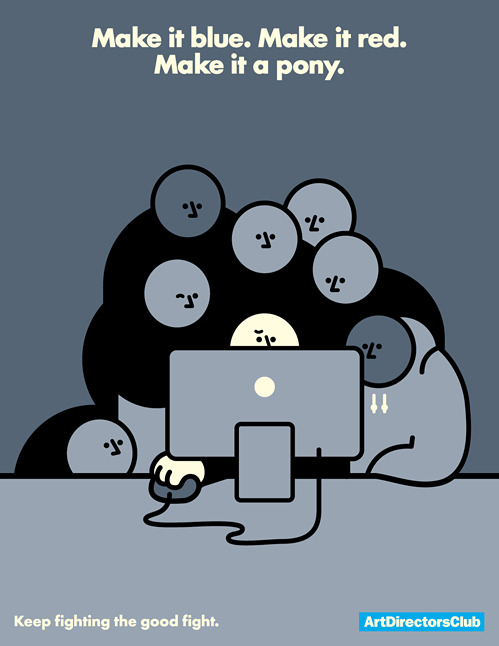
 “Make it blue. Make it red. Make it a pony.” - Art Director’s Club. Absolutely hilarious.  
vincentgabriele:

ArtDirectorsClub


Signature

Tuesday, May 14, 2013

If it weren't for the last minute, I would never get anything done.

I have been a bad design blogger. I don't talk much about design, I don't do tutorials anymore, and overall I just suck.

But today, today I turned in my final project for Integrated Graphics. I literally started it like last week. And the majority of it I did over the weekend.

The project was that we had to come up with an original game idea, and make a case, a cartridge or disc (depending on the system, obvi.) and a manual to go along with it. 

Procrastination is like my worst trait, but it's hard not to when I know I do well under pressure. ;)

My worst problem with this project was that I couldn't figure out what game to make. And then it came to me.. Just Dance with zombies! We all know how I feel about zombies

This project was done exclusively in Illustrator. I'm kind of an Illustrator nerd. I was going to do the manual in InDesign, but at the last minute, it was just easier to it in Illustrator. I'm lazy like that.

I feel so much better that this project is now turned in. Now all I have left is a couple of performance tests in the programs (Illustrator, InDesign, and Photoshop) on Thursday, and another next Thursday, and then I graduate next Thursday night (May 23rd). So much excitement!

I have another class that I am in this semester, but this project beats my other final project. Maybe I'll show that one too. But I like zombies. Let me know what you think! I'd love to see what you guys think.

Zombie Dance Party


Disc


Signature

Friday, December 7, 2012

Freebie Friday: Christmas Clipart!

So you know a bad way to wake up? 
A cat biting your toes.
I don't recommend trying it at home.

But despite that happening (for the second time.. Loki wants me up early, I guess) I am in a pretty good mood!

(It might be that candy bar I had for breakfast. Who knows?)

Do you have plans for the weekend? I hope I can get the rest of my list of gifts bought! (If my bank allows)

Oh, and then there is this:


So I will probably be pretty busy.
But I love being busy! It means that I am needed. And who doesn't like to be needed?

Anyway. I have a gift for you today, because it's Friday, and because I love you! 


Christmas clipart! Click on the image to download the file at full resolution. It's a transparent PNG, so you can overlay it over other things. If you have problems with this, please let me know.

In other news, I have figured out that I love drawing snowflakes! Aren't they beautiful? Something we never get to see here in this part of California. :(

I hope ya'll have a great Friday, and I think I am going to write up a post about my design process so far. But who knows. Maybe I'll come up with something more interesting!


Signature

Tuesday, December 4, 2012

Announcing: Jessie Kay Graphics and Design Shop!

I have been away from you guys for a few days. Well, actually longer, but I was prepared with scheduled posts! Did you miss me?

I missed you!

Things have been crazy around here. I have been getting design work from a new client, who loved my work (and paid his invoice right away, so I already love him!) plus my regular job, plus finishing up my classes for the semester. All of that equals a tired Jessica.

In the midst of all this, I opened up a Etsy shop!

Am I crazy?

I already love it!

You can check it out here.

Here are a few things you can see there right now:


I love Chalkboard art! And I finally figured out how to design it! Makes me soo happy!

And here's another one:


So you know that it isn't all Christmas-y. I only have four up currently, but I am always working to add more!

In the future, I am going to be adding design work, like blog headers and logo design, and other design.
I am also thinking of adding prints of some of my landscape photography.

What do you think?

Am I crazy for taking on this endeavor? 

Signature

Saturday, December 1, 2012

Design Tips: Vector Vs. Raster

Graphic Design can be a fickle thing. One minute you are designing an awesome logo, right, for business cards. Then, the client loves it so much that they want to put it on a billboard! Awesome right?
Well, it could go both ways. Did you create it in Photoshop, or Illustrator? (Photoshop can do some vector, but I'm generalizing here.) 

Chances are, if you created it in Photoshop, it isn't going to work and you are going to have to start alllllll over. Unless of course you started working at the size of the billboard. (Quick tip: Always, always easier to design larger and scale down than the other way!)

If you created it in Illustrator, you are good to go!

But why does it matter?

The difference is in two words: Raster and Vector.

Basically, these are both ways of how your artwork is created. 

The top picture on my above collage is Raster. You may remember it from my Fall Palette post. Raster is a grid of colors that make up the pieces of your artwork. All those squares of color make up larger spots of color and so on. These squares make up your DPI, or PPI. In Raster, the DPI is very important because that is how many squares you have in a given inch. (DPI = Dots Per Inch, also called PPI, or points per inch). The more squares, the more seamless the transition from color to color, which makes the image look sharp. The problem with this system is that if you create small artwork and then need to resize it, instead of have a bunch of tiny boxes with almost seamless color, you are just enlarging the boxes, making the once seamless color look boxy and pixelated. Make sense?

I hope so. That took a lot of thought to explain.

Vector is a little bit easier. Vector is basically created with mathematical equations. In the above picture, I show the points on the lines. Illustrator (or other Vector program) creates your artwork based on the equation of the distance between those two lines. When you enlarge your artwork that is vector, the equation is just multiplied exponentially, depending on how you scale it. Vector artwork can be rasterized, also, and has to be for some applications, but it is hard to vectorize rasterized artwork. It, in theory, has to be recreated.  If that makes sense.

Now, I'm not saying to never use raster artwork, or to kill Photoshop. None of that. (I love Photoshop!)
I'm just saying it has its place in certain applications. As does Illustrator.

Photos will not be vector. They could, but the files would be too massive for most computers. And it you would basically have to recreate it. 

And also, a lot of effects in Photoshop aren't available in Illustrator. Vector just can't create some of the same effects with the equations and what not. 

My advice to you is for applications like logo design: Create a vector logo. Or have one made for you, in either .EPS or .AI. A good designer should have no problem with that. And once you have that, if you need edits made in Photoshop, you can do so. But keep your vector file.

You may need it. 

But, chances are that if you are creating something for yourself, and you're not a graphic designer by trade, you probably won't ever see Illustrator. That's fine. A lot of designers go their whole lives without touching Illustrator. I am just pretty much a Illustrator fan girl. But if this situation sounds like you, my advice is to always create larger than what you need. Scale down. Always. If you are making your business card, I would say design at least a few times larger. Maybe if your business grows you will need a banner. And then that enlarged logo will be helpful.

I hope this helps. I hope I explained everything okay. As always, feel free to contact me, or leave comments and I will always get back to you!


Signature

Friday, November 30, 2012

Freebie Friday: Christmas Printables

I love everything about Christmas. I love the decorations. I love hot chocolate. I love snuggling under warm blankets. I love Santa Hats. I even love rain and cold weather!
I love the baking. I love the time with friends. 


I am a total winter girl (my birthday is in February), and Christmas is one of my favorite days of the year! 
I will also be celebrating Hannukah this year, but that's a different post for a different day. 
Today, since its Friday, and since I love you, I have not one, but TWO freebies! Two free Christmas Printables! I am thinking of opening an Etsy store, to design things like this, because it is so much fun. And so different from what I do all day at my day job. What do you think?
Could I make the cut?
Anyways, click the image of the printable you want to go to the download page.
Let me know what you think. :)


And even though this picture has nothing to do with this post, I have to show you. Loki is crazy.  And loves bags.


Happy Friday, Loves! Come back tomorrow for Design Tips: Vector Vs. Raster.

Signature

Saturday, November 24, 2012

Design Tips: The Shape Builder Tool


So I am going to try something a bit different today. I am left aligned!
It looks different from over here.

I kid, I kid.

What have I got in store for you today?

A TUTORIAL!


Well, really, a tip, if you will. The Shape Builder Tool in Illustrator. It's a really great tool that is new to CS5. Think of it as Pathfinder's new, cute, little brother.

Not that Pathfinder doesn't have its uses, but don't get me started on that.

It could get ugly.

Getting down to business.


Say you have two boxes, like the ones above. And you want to join them.

What are you to do?

The shape builder tool to the rescue! You just select the shapes you want to join, as shown above, and use the shape builder tool.


And, using the tool, drag across the shapes to create the shape you want. The shapes that are going to join will turn a dark grey. The line show is the line I used to create the shape in the next picture. That actually shows. So it's pretty helpful.


And, like magic, you now have one congruent shape! Once you get the hang of it, it only takes about five seconds. Honest.
I hope this helps! I love posting these little tips!
If you ever want to learn anything special, leave a comment or contact me.

Signature

Friday, November 23, 2012

Freebie Friday: Storyboard Template

Happy Black Friday, Loves! 
I hope you had a fabulous Thanksgiving, if you're into that kinda thing. I'm still pretty full!
I have something great to announce today.
 
I am going to start a new feature around these parts.
It's called Freebie Friday!
 
 (Kinda goes well with today, considering many of you might be out shopping for deals!)
 
What I want this to be is one day a week (hopefully) I want to offer you a little something for free. It will probably be things like templates or printables. That kind of thing. But who knows, it could grow into something better! I'm always open to ideas! Let me know in the comments if there is any kind of template or anything you are looking for.
 
I am always here to help.
 
For today, I have a storyboard template. It's kinda similar to the Collage Template I shared not too long ago, but its only three pictures.  Something like you would use on your blog.
 
Images like these help your blog load faster, because instead of loading 3 pictures, it only has to load one. 
Plus, I think it makes a post look pretty sharp. And organized like.
 
I used this template to make this, because this weather makes me miss the mountains.
Enjoy!
 
Click here to download this PSD file template.
Disclaimer: This file was created by me and is my intellectual property. 
You are free to use it for noncommerical work, but please do not redistribute as your own.
 That is stealing and it makes me sad.
Signature

Tuesday, November 20, 2012

Christmas Color Inspiration

Last year was mine and Dakota's first Christmas living together. So, naturally, we had to decorate. Well, I needed to. Dakota probably couldn't have cared less. 
 
I really wanted to keep things classic, in terms of color. I love when things match. It's kind of an OCD thing I have. I think its part of what makes me a great designer. But its kind of an issue as well, because I can't break out of that box sometimes. 
 
But that's a story for a different day.
 
Today is time for a color palette! All about Christmas! This one is a little similar to the Fall Palette I showed a while back. I think the main idea for Fall and Christmas is warm, inviting colors. 
 
I just love classic colors for Christmas. Do you stay classic or do you go for the new aqua blues and other colors I've been seeing lately?
 
Let me know in the comments!
 
Enjoy!
 
 
Tree Image Source
Signature

Monday, November 19, 2012

Designer or Artist?: Getting Inspired


Every year, there it was, under the tree, wrapped with my name on it. I would be happy every time I got one, because they were all different, but I was never really surprised. I received art supply kits for Christmas since I was in Kindergarten. And I would use every last piece. The markers, the crayons, the watercolors, the colored pencils. Every piece would be loved and used.

I used to consider myself an artist. 
But now I consider myself a "designer".

When did that change? What is the difference?

A designer creates artwork. An artist can design.
So where do we draw the line?

I think it has something to do with that designers don't create for themselves. And artists do. In my opinion. 

But artists create for other people.

It's a conundrum. 

I need to inspire myself. Look at what I used to create, and be inspired.
I used to create for myself. For the fun. But do I do that?

I'm trying to now, for sure.

But I need to get inspired.

So in this journey, I decided to show you some of my more favorite pieces I have created.


1) A converse shoe made with the gradient mesh tool in Illustrator. I am working on a post on how to use this tool. It really is an amazing tool. I had so much fun doing this. It was for an assignment for my Digital Imaging class. As was #3. Actually, #3 was for the same assignment. But this one I enjoyed so much more.

2) Rocko's Modern Life. I drew this probably 6 years ago, for my exboyfriend. I don't even know if he still has it. Maybe I should ask for it back. Think he would give it back after all these years? Who knows. This is hand drawn and colored.

3) This rose was created, like number one, with the gradient mesh tool. It isn't perfect, but I love it anyway. 

My goal in having this blog is quickly changing. I not only want this to be a resource for you to grow and learn, but also as a creative outlet for me to grow and learn as an artist AND as a designer.

Do you ever look back at your old work and get inspired?
Do you create for yourself?


Signature

Saturday, November 17, 2012

Design Tip: Adobe Kuler for Color Palettes!

I love color. I love color palettes.
It is all just so organized and beautiful.
And when I discovered Kuler, I fell in love.
Kuler (pronounced "cooler", btw) is a color palette tool.
It's pretty stinkin' awesome.
You can do things like shade palettes..
Or do something different and do a compound palette..
Or you can even upload a picture and create a color palette from the image, like this fall themed one below:
(Image Source)
I thought this would be a handy tip for all of you, designers and non designers included!
Especially for blog design!
Also, Kuler has an extension for InDesign, Illustrator, and Photoshop.
Want to learn more?
Contact me or Send me a tweet :)
P.S. I was not compensated for this post. I just love Kuler and thought you would too!

Signature

Friday, November 16, 2012

Friday Faves

Happy Friday, Loves! I am so glad to have made it.

I have been oh so busy this week! Writing posts and planning some awesomeness for my lovely readers. I am so excited I can barely contain it! I want to hit "publish" on all my queued up posts!

But their time will come!

But for today, I have been carefully (read: stumbleupon) looking for great links to share with you!


Ashley After Nine to Five is celebrating her two year bloggiversary! Check out her reflection on the past two years. Warning: Lots to read!

I love these cheat sheet wallpapers! Might come in handy!

Check out 25 Best Sites to Download Free Vector Files... what a resource!

I might have to experiment with these watercolor brushes for Photoshop and create a portrait like Kristen did.

I love this Kate's post about Posting Frequency and Blogging Guilt. Great piece. What a reminder to easy on ourselves and remember why we blog in the first place.

I found a great article about things you didn't know Illustrator could do. I knew most, but I learned something! 


This week I broke my life into numbers. I also wrote a little bit about myself for thLiebster Award. I showed you a little bit of inspiration through Minimalist Movie Poster Design.  And today I showed you a fall color palette that I love.

I am really excited about what is to come here at the blog. I know what I want to blog about. I know that I have a lot to teach you. I hope that I can do that well. And I hope you will stick around for this journey with me. 

I am definitely looking forward to it.

Check back tomorrow for a Design Tips post on making your own color palettes!


Signature
Related Posts Plugin for WordPress, Blogger...